Polar Area Charts
This section describes how to create polar area charts using the Image-Chart API.
Overview
Polar area charts are good for showing proportional part-to-whole information. You can create a single series polar chart, where each series is made of multiple slices, or multi-series, polar charts.
Each series describes one pie, and each data value specifies one slice. When using overlayed polar charts (described below), use multiple series.
To display the text associated with a slice, you will have to use a chart legend. The legend will be a text associated by color.
Simple

cht=pa
chd=t:60,40,20
chdl=Image|Charts|Rocks
chxt=x
chco=FF00007F,00FF007F,0000FF7F
Values are displayed relative to each other: so a chart with values 1,2,3 will look the same as a chart with values 100,200,300.
Negative values display as empty slices of the appropriate size.
Values are displayed relative to each other: so a chart with values 1,2,3 will look the same as a chart with values 100,200,300.
Negative values display as empty slices of the appropriate size.
Slice gradient fill
It also possible to use gradient fill chf=ps<index>-<sliceIndex> to specify a gradient per pie slice.

cht=pa
chd=t:60,40,20
chdl=Image|Charts|Rocks
chf=ps0-0,lg,45,ffeb3b,0.2,f44336,1|ps0-1,lg,45,8bc34a,0.2,009688,1|ps0-2,lg,45,EA469E,0.2,03A9F4,1
Display axis labels
Because axis labels are behind pie slices, leverage serie color transparency to let the value visible.
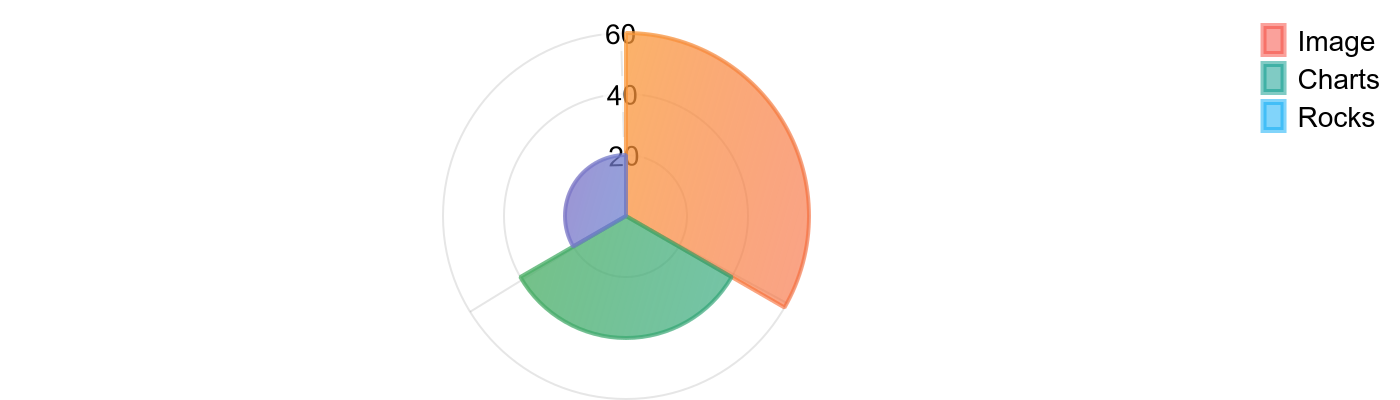
cht=pa
chxt=x,y
chd=t:60,40,20
chdl=Image|Charts|Rocks
chf=ps0-0,lg,45,ffeb3b,0.2,f443367C,1|ps0-1,lg,45,8bc34a,0.2,0096887C,1|ps0-2,lg,45,EA469E,0.2,03A9F47C,1
Chart animation
Just like the previous example but with &chan, see gif animations for deeper configuration.

chan
Slice labels
Chart labels also work with polar area charts.

chl=2018|2017|2015
Chart Types
Specify a pie chart with the following syntax:
Syntax
cht=<chart_type>
Where <chart_type> is one of the the following types:
pa: Two dimensional polar chart. Supply one or more data serie. Subsequent data series will automatically overlay previous ones.
By default, pie segment colors are interpolated from pink to pale yellow. Specify other colors as described in Series Colors. Specify serie legends with chdl as described in Chart Legend Text and Style.

cht=pa
chs=700x200
Series Colors
You can specify the colors of all values, each value, or some values using the chco parameter.
Syntax
chco=<slice_1>|<slice_2>|<slice_n>,<series_color_1>,...,<series_color_n>
<color>Slice colors in RRGGBB[AA] hexadecimal format. Specify a single series color and all slices in that series will be colored in gradations of that color from darkest (first data member) to lightest (last data member). Specify two or more colors delimited by a | to describe individual slice colors. When you have multiple series (that is, a chart with concentric rings), you can specify values for different series by separating values by a comma. When fewer slice/series colors are given than slices/series displayed, then the chart will cycle through from the beginning of the slice list for the series, or the series list for the chart. You cannot specify a distinct gradient for each series in a multi-series chart.
Examples
Specify a single color to have gradations from darkest (first slice) to lightest (last slice).

chco=FF00007F
Defining a gradient; here, from yellow to red.

chd=t:10,20,30,40,50
chco=FFFF10,FF2027
Defining individual slice colors; specify one color per slice.

chd=t:10,20,30
chxt=x
chco=EA469E|03A9F4|FFC00C
Legend
You can display a legend for each individual polar chart slices using the chdl parameter, one legend entry per slice.
Only URL-safe characters are permitted in label strings. To be safe, you should URL-encode any strings containing characters not in the character set 0-9a-zA-Z.
Syntax
chdl=
  <legend_value>|
    ...
  <legend_value>
<legend_value>A string value to apply to a slice. Legend labels in polar chart are applied consecutively to the data points inchd. If you have multiple series (for a concentric pie chart, for example), labels are applied to all points in all sequences, in the order specified inchd. Use a pipe delimiter (|) between each label. Specify a missing intervening value by using two consecutive pipe characters with no space between them:||. You do not need to label all slices.
Note: unlike Google Image Charts you won't need to anticipate how much room your need to display labels entirely. Image-charts automatically scale the graph to display labels.
Examples
Let specify legends for a simple animated polar chart.

cht=pa
chd=t:20,20,30,40,50
chdl=20deg|20deg|30deg|40deg|50deg